rekordbox Auto Gain vs waveAlign

rekordbox Auto Gain measures each track's loudness and evens levels on the fly. But that gain lives inside rekordbox: it is not baked into your files, and CDJs ignore it entirely. waveAlign takes a different route. It normalizes the audio itself to a standardized loudness target, so tracks play at consistent loudness everywhere: CDJs, USB sticks, other software, any player.
How rekordbox Auto Gain actually works
During analysis, rekordbox measures each track's loudness in LUFS and uses that value to even out how loud each track plays. This is done using a transparent gain offset, which is shown in rekordbox's Mixer section and can be fine-tuned during mixing.
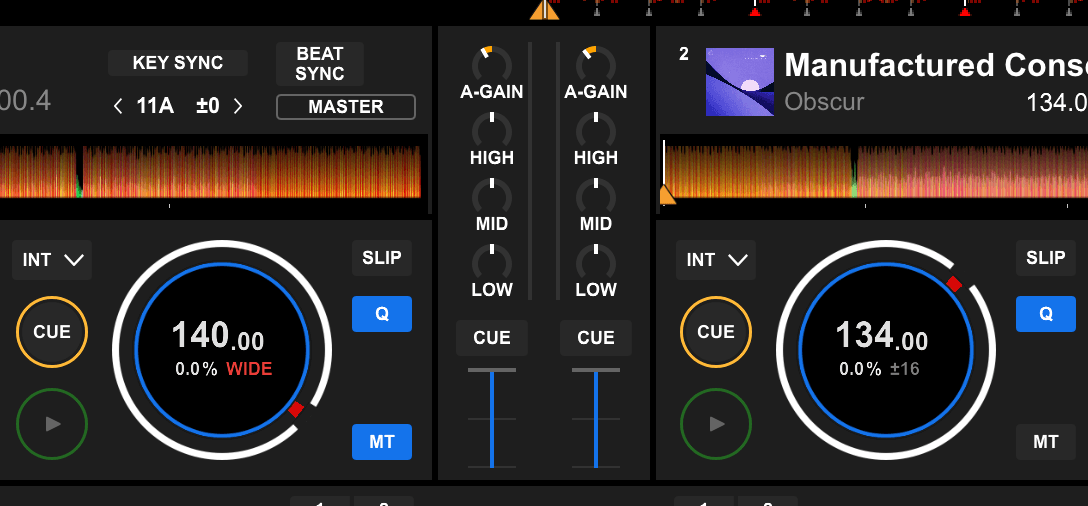
rekordbox's per-channel A-GAIN, shown at the top of each channel strip in the Mixer section.
Why Auto Gain doesn't work on CDJs, USB or standalone gear
Here's the catch most DJs hit at the club: the Auto Gain value doesn't leave rekordbox. It isn't baked into your audio files, and CDJs do not read it from an exported USB stick. Neither do standalone controllers. This means the moment you step off your laptop/controller setup and onto club CDJs or standalone controllers, the leveling is gone and you're back to chasing the trim between every track. The same happens if you load those files into any other software.
At a glance
| Feature | waveAlign | rekordbox Auto Gain |
|---|---|---|
| rekordbox controllers with a laptop running Performance mode | ||
| CDJs | ||
| Standalone DJ controllers | ||
| Other DJ software like Serato or VirtualDJ | ||
| Basic playback in Apple Music or other media players | ||
| Basic gain adjustment | ||
| Mastering-grade limiter for very high dynamic range | ||
| Keeps cue points & beatgrids | ||
| Batch-process the whole library | ||
| macOS + Windows | ||
| Price | €79 one-time | Included with rekordbox |
Where waveAlign is different
waveAlign normalizes the audio itself to the BS1770-4 (broadcast-standard) loudness target. This is the same standard streaming services like Spotify, Apple Music and Netflix use. Because the loudness is written directly into the files, it travels with them: CDJs, USB, Serato, Traktor, any player. Its mastering-grade limiter can lift even highly dynamic tracks up to the same foundation transparently, where a gain-only approach like Auto Gain has to leave them quieter to stay under the ceiling. Cue points, beatgrids and metadata stay intact.
Bringing dynamic tracks up to the same level
Most tracks only need a clean gain change to hit the target loudness. But some tracks are highly dynamic: their peaks sit far above their average level. Neither tool will clip these, because both keep peaks under a safe ceiling. The difference is what happens next.
To stay under that ceiling, a gain-only tool like Auto Gain can only raise such a track until its loudest peak reaches the limit. That keeps it safe, but the track lands quieter than the rest: its peaks used up the headroom before its average loudness could catch up. On a big, dynamic track you're back to reaching for the trim.
waveAlign's mastering-grade limiter solves this. It eases down just the few peaks that block the way, by a small, transparent amount, so the track's perceived loudness can rise to the same foundation as everything else. No clipping, and no track left quietly behind. The groove, transients and body stay intact.
FAQ
Does rekordbox Auto Gain work on CDJs? No. Auto Gain only applies in Performance mode on a connected controller. The gain value isn't read by CDJs from a USB export, so on club players your tracks play back at their original, uneven loudness. waveAlign avoids this by writing the loudness into the files themselves.
Does rekordbox normalize volume? Only inside rekordbox. Auto Gain evens track loudness during playback in Performance mode, but it doesn't normalize the audio files themselves, so the leveling is lost on CDJs, USB and other apps. waveAlign normalizes the files to a BS1770-4 target, so the loudness stays consistent everywhere.
Why is my rekordbox Auto Gain not working? The most common reason is that Auto Gain only applies in rekordbox's Performance mode. It has no effect on CDJs or standalone players reading from a USB stick, and it is never written into your files. If you've stepped off a laptop setup, that's expected. Normalize the files with waveAlign instead so the levels travel with them.
Should Auto Gain be on or off in rekordbox? On is fine for a laptop-plus-controller setup: it evens levels while you play. Just remember it only lives inside rekordbox. If you also play CDJs or hand off USB sticks, normalize your library with waveAlign so your levels are consistent regardless of the Auto Gain switch.
Does waveAlign work with rekordbox? Yes. waveAlign processes your audio files, so rekordbox (and CDJs, Serato, Traktor and any other player) reads already-leveled tracks. Your cue points, beatgrids and metadata are preserved.
Is waveAlign a subscription? No. waveAlign is a one-time purchase. Buy it once and own it forever, with no monthly fees.
References
Like what you see? Share with a friend.
Ready for perfectly balanced audio?
Try waveAlign and experience consistent loudness across your entire library.
Buy Now