Best Audio Format for DJs: The Definitive Tier List


Best Audio Format for DJs: The Definitive Tier List
You've got a USB packed with tracks and you're about to walk into a club. The CDJ loads your file and... nothing. Unsupported format. Or worse, it plays but the track shows "Unknown Artist" because your metadata got stripped somewhere along the way.
Format choice isn't glamorous, but it matters. It affects whether your tracks load at all, whether your cue points survive, and whether your library stays organized after 500 gigs. So here is a clear-eyed look at every major audio format for DJs, ranked by what actually counts: compatibility, audio quality, metadata handling, editability, and file size.
But even when formatting your stick right, the wrong audio format can still lead to issues. See our article on the best audio formats for DJs for more info.
But now:
Best audio format for DJs ranked, in descending tier order.
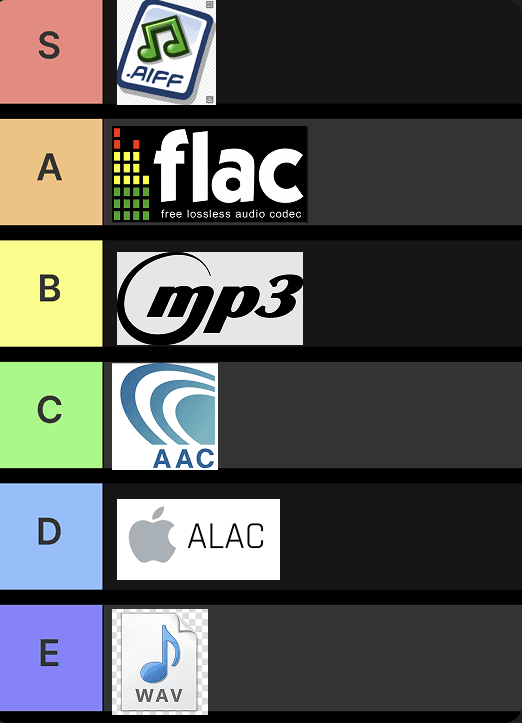
The tier list for most common DJ file formats
What Makes a DJ Format Good?
Before handing out tiers, here's the ranking criteria in order of importance:
- Compatibility on players — Does it load on older CDJs and XDJ units without issues?
- Audible audio quality — Lossless or lossy? Does it matter in a loud club?
- Metadata handling — Does artist, title, artwork, and BPM survive intact?
- Editability — Can you modify tags and re-analyze tracks without corrupting your library?
- File size — How much storage are you sacrificing?
With that framing established, let's get into it.
S Tier: AIFF

Apple's AIFF Format is the best choice for DJs
AIFF is Apple's take on uncompressed audio, and it is the best all-around format for a DJ library. Here's why it earns S Tier:
Compatibility is excellent across Pioneer's CDJ and XDJ lineup, including older units. You won't get the Bandcamp-style encoding quirks that plague WAV files. It loads cleanly.
Audio quality is lossless and uncompressed. Identical to WAV at the same bit depth and sample rate. There is no audible difference between a well-sourced AIFF and a WAV, but that's the point: you get the ceiling of quality with none of WAV's baggage.
Metadata is where AIFF genuinely shines. It natively supports full ID3-style tags: artist, title, album art, BPM, key, and cue points. Unlike WAV, that metadata is embedded in the file itself. Move it between drives, rename folders, migrate from Rekordbox to Serato and back: your tags come with it.
Editability is the sleeper advantage. You can edit AIFF tags in place without affecting your waveforms, beatgrids, or how DJ software analyzes the track. It behaves predictably.
File size is the only real downside. A six-minute AIFF sits around 60-65MB. You are paying a storage premium compared to compressed formats. But storage is cheap.
AIFF: lossless audio, full metadata, bulletproof compatibility. The only cost is file size.
A Tier: FLAC

FLAC is also a great choice for DJs
FLAC is the smart engineer's choice: lossless audio compressed down to roughly half the size of AIFF or WAV. You lose nothing in audio quality, but you gain meaningful storage efficiency.
Compatibility is where it drops from S to A. Modern CDJ-3000s and XDJ-XZ units support it, but older hardware is unpredictable. If your venue has modern gear, FLAC is excellent. If you're ever in doubt, it's a gamble.
Metadata support is solid. Full tags, artwork, the works.
Editability introduces a subtle risk. Some DJ applications have been known to corrupt FLAC files when writing updated analysis data back to the file. It is not universal, but it happens often enough to be worth noting.
If you have a modern setup and know your venues, FLAC is a strong choice. If you play anywhere with older or unknown gear, carry an AIFF backup.
B Tier: MP3

MP3 is a solid choice for DJ's due to it's compatibility
MP3 at 320kbps is the universal fallback, and it has earned that status. It runs on everything, from the oldest CDJ to the cheapest club controller you have never seen before. No questions asked.
Compatibility is unmatched. Virtually no DJ player on the planet rejects a 320kbps MP3.
Audio quality is where the debate lives. In a club environment with a loud PA, poor acoustics, and a crowd making noise, most people cannot reliably distinguish a high-quality 320kbps MP3 from a lossless AIFF. That said, on a proper high-end sound system in the right room, some DJs will notice. If you're playing a boutique listening event, lossless is worth the effort. For most club work, 320kbps is fine.
Metadata is well supported. MP3 with ID3 tags handles artist, title, artwork, and BPM without issue.
File size is compact: roughly 14MB for a six-minute track at 320kbps.
The main reason MP3 sits at B and not higher: it is lossy. You are starting from a compressed source, and you cannot get those missing frequencies back.
C Tier: AAC

AAC is a strong format, but can lead to compatibility issues
AAC is technically superior to MP3 at equivalent bitrates. It sounds better with smaller files. Apple built it as the spiritual successor to MP3, and from a pure audio standpoint, it mostly is.
Compatibility is the problem. On modern software and Apple devices it's fine. On older Pioneer hardware, AAC can be unreliable. Not as universally supported as MP3, and unpredictably so.
If you're entirely in a controlled setup where you know the gear supports it, AAC is usable. As a library-wide format, it's a risk not worth taking when MP3 works everywhere.
D Tier: ALAC

ALAC is not really recommended for DJs
ALAC is Apple's lossless compressed format: the Apple equivalent of FLAC. The audio quality is identical to FLAC, but compatibility with DJ hardware is significantly worse.
FLAC became the de facto standard for lossless compression in the DJ world. ALAC never did. Most Pioneer and Denon hardware treats it as an afterthought, and support is inconsistent even on newer units. There's no meaningful advantage over FLAC in a DJ context, and a meaningful compatibility disadvantage.
For DJ use, ALAC doesn't make sense when FLAC and AIFF both exist.
E Tier: WAV

wav is the worst choice for DJs
WAV looks like the obvious choice. It's lossless. It's uncompressed. It's been around forever. And yet it belongs in E Tier for DJs, because it has two specific problems that cause real-world failures.
Older CDJ support is more complicated than most people realize. While most modern hardware handles WAV without issue, older CDJ-2000s and early XDJ models have documented playback problems with 24-bit WAV files. The spec may claim support, but reliability in practice is another matter.
The Bandcamp bug is the bigger issue for most DJs today. WAV files downloaded from stores like Bandcamp are often encoded with a WAV_EXTENSIBLE header, a metadata extension intended for multi-channel audio. Older players cannot read it and throw an error, even when the audio itself is a completely standard 16-bit stereo file. You've bought a track, downloaded it correctly, and it won't load. That's a problem.
Metadata is WAV's worst category. WAV has a limited metadata container. DJ software can store tag information for WAV files, but it does this in its own database rather than embedding it in the file. Move those WAVs to a different drive, reorganize your folders, or switch software, and you can lose all of that information. Your track becomes "Unknown Artist - Unknown Title."
There's no situation where WAV is the correct choice when AIFF is available. They are sonically identical. AIFF does everything better. WAV's only advantage is slightly broader cross-platform support outside the DJ world, which is irrelevant when you're building a DJ library.
Why Your Loudness Levels Matter Too
Getting the right format is one piece of the puzzle. The other piece is making sure every track in your library plays at a consistent loudness level.
Even a perfectly organized AIFF library will have you riding the gain knob all night if your tracks aren't normalized. One track peaks loud, the next one is quiet, and you're playing catch-up instead of playing music.
waveAlign normalizes your entire DJ library to a broadcast-standard LUFS target in a non-destructive way. It preserves your dynamics, your transients, your cue points, and your metadata: everything that made you choose AIFF in the first place stays intact. It doesn't "enhance" or alter your files the way older tools did. It just brings every track to a consistent level so you can focus on your set.
If you've done the work of building a clean, well-formatted library, waveAlign makes sure it plays like one.
Conclusion
The best audio format for DJs is AIFF. It wins on compatibility, handles metadata properly, is easy to edit without breaking your library, and delivers lossless audio quality. The only real cost is file size, and that is a trade worth making.
FLAC is a strong second if your gear is modern and you want to save storage. MP3 at 320kbps is your compatibility safety net. AAC and ALAC exist in edge cases. WAV, despite its reputation, creates real-world problems that AIFF simply doesn't.
Build your library in AIFF. Normalize your tracks to a consistent LUFS level with waveAlign. Show up knowing your files will load, your metadata will display, and your levels will be right.
Like what you see? Share with a friend.
Maxim Osipovs
Maxim is a DJ and software developer from Düsseldorf in Germany. As one of the founders of the waveAlign project he's eager to elevate musical performances on new levels. With a background in Pharmacy and almost ten years as a corporate strategy manager he took the leap this year to fully focus on the waveAlign project, as well as working as a freelance consultant for AI-supported process optimization.
Ready for perfectly balanced audio?
Try waveAlign and experience consistent loudness across your entire library.
Buy Now