How to set gain staging on Pioneer mixers?

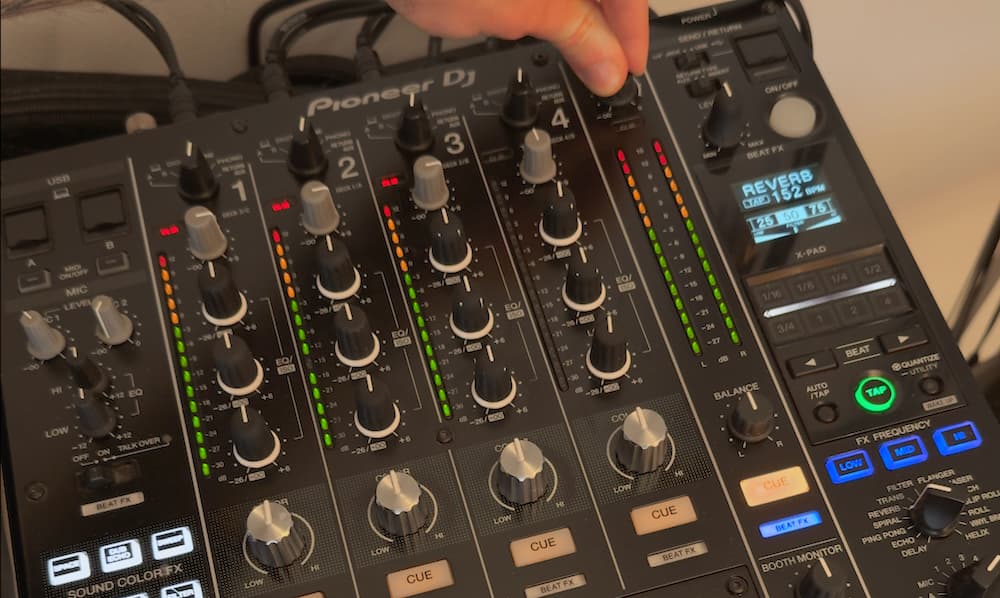
There's a moment every DJ knows. You're mid-set, a track hits harder than expected, and the channel meter spikes into the red. Do you back off immediately, or is there still room to work with?
Most DJs operate on instinct: red means bad, stay green. But how much does hitting the red on a Pioneer mixer actually matter? And how much headroom do you have before the signal breaks?
We ran a controlled measurement test on a DJM-900NXS2 to find out exactly where saturation begins, where the clip indicator fires, and where the signal actually distorts. The results are more precise than the usual advice. And they change how you should think about Pioneer DJ mixer gain staging in practice.
What Headroom Means in a Digital Mixer
Headroom is the gap between the level your signal runs at and the maximum the system can handle before it distorts. When a signal exceeds that ceiling, it clips. The waveform peaks get cut off, producing harsh digital distortion.
Unlike analog hardware, which saturates gradually as you push it, digital clipping is abrupt. One moment the signal is clean, the next it isn't. There's no subtle warning in how it sounds. That's why your meters matter so much when mixing digitally, and why understanding what they're actually telling you is worth the time.
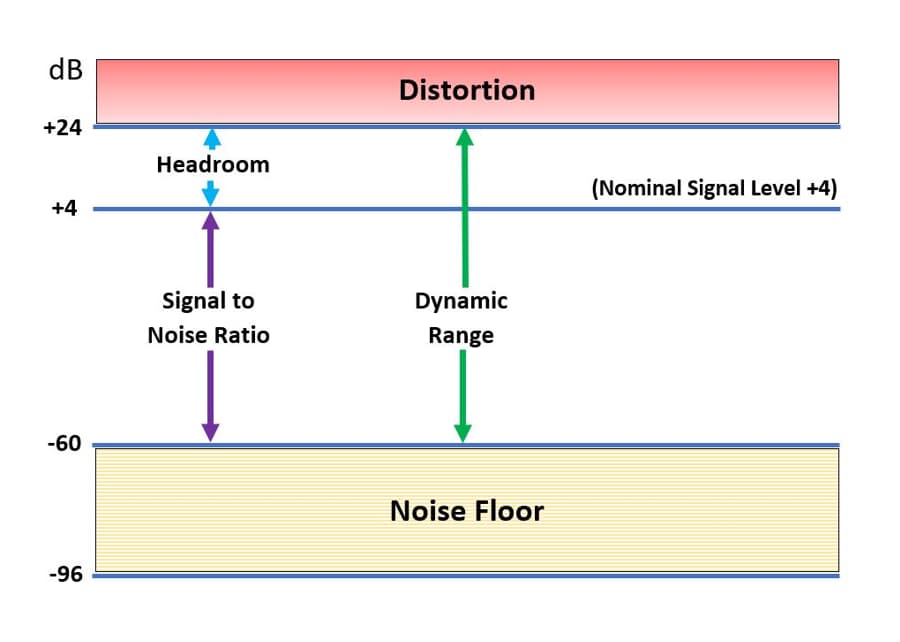
Headroom & Dynamic Range explained
Our Test: Mapping the Clipping Threshold
We fed a 200 Hz sine wave into a single channel on the DJM-900NXS2 and measured the output using Plugin Doctor, a precision signal analysis tool. We increased the signal level step by step and recorded both the channel meter reading and the measured output at each point.
Here's what we found:
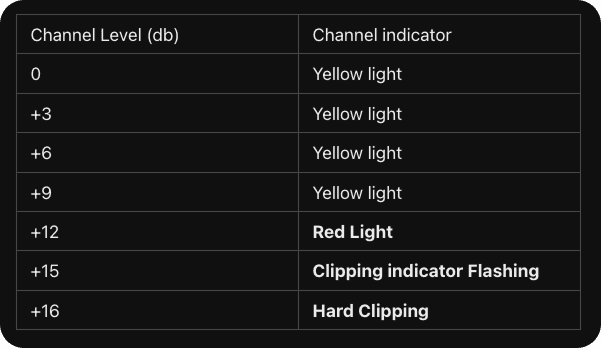
Headroom results for Pioneer DJM900NX2
Three things stand out from this data.
First, there is no saturation building up as you approach the red. The signal stays completely clean all the way to the threshold. This is how digital processing works: you don't get the gradual warmth you'd get from pushing an analog desk. It's clean until it isn't.
Second, the clip indicator starts flashing at +15 dB while the signal is still clean. It's a genuine early warning, giving you 1 dB of notice before the signal actually breaks.
Third, and most importantly: once the red light comes on at +12 dB, you have 4 dB of headroom remaining. At +16, the channel hard clips.
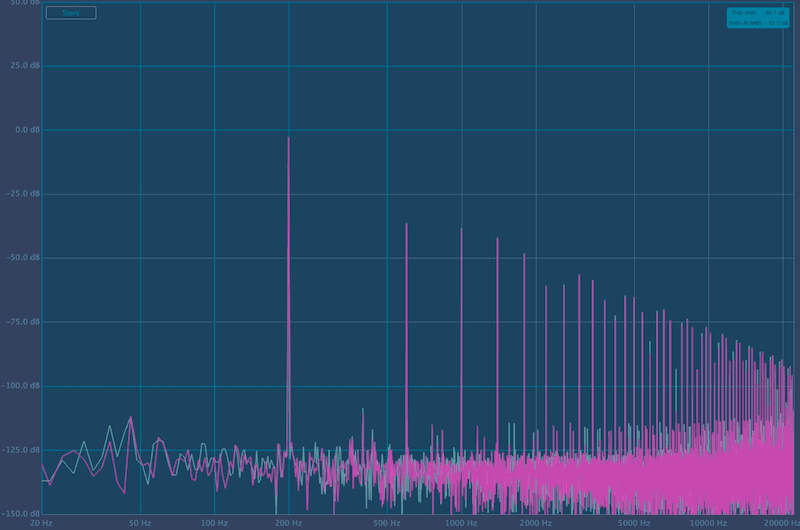
How clipping looks like on the Pioneer DJM
What the Results Mean for Your Gain Staging
Four decibels sounds like a reasonable buffer. The issue is how fast you can burn through it in a live set.
Tracks in a typical DJ library are not mastered to the same level. A heavily compressed modern EDM track and a vinyl rip from the 1990s can easily differ by 6 to 10 dB in perceived loudness. When you set your channel gain for the quieter track, the louder one spikes. When you set it for the louder one, the quieter track sits low and the instinct is to push the gain up to compensate. Mid-transition, managing two channels at once, one unexpected spike puts you past +16 before you've had time to react.
The practical guidance from our measurements:
- Target +0 to +6 dB on the channel meter for your average level. This keeps you clear of the red zone and gives you real room to absorb peaks.
- Treat the red light as a hard limit. When it flashes, you are 4 dB from distortion.
- Don't rely on the gain knob alone to manage loudness differences across tracks. There's tools to reduce loudness variances before your gig.
How Loudness Inconsistency Makes This Worse
The main reason DJs end up riding the gain knob mid-set is that their tracks aren't at consistent loudness levels to begin with. A library built from Beatport downloads, SoundCloud rips, promo files, and vinyl transfers will contain tracks mastered at radically different loudness levels. Some might sit at -8 LUFS, others at -16 LUFS. That's an 8 dB difference in perceived loudness — double the headroom margin we identified above.
When your tracks are all over the place, you're constantly compensating. You push up for a quiet track, pull back for a loud one, and during transitions you're managing both at once. The 4 dB buffer gets eaten up fast.
The most effective fix isn't developing faster reflexes on the gain knob. It's normalizing your library to a consistent loudness target before you ever show up to a gig. When every track is brought to the same perceived loudness level, your channel gain can sit in the same position through most of your set. Your headroom stays intact. You stop chasing levels and focus on the mix.
This is exactly the problem waveAlign was built to solve. It applies broadcast-standard LUFS normalization to your entire music library without touching the dynamics or metadata. No compression, no alteration of the original sound. Your cue points, tags, and playlists stay exactly as you set them. The tracks just play at consistent levels, which means the gain staging work you put in before the gig actually holds up across your whole set.
Conclusion
Pioneer DJ mixer gain staging is more nuanced than "stay out of the red." Our measurements show the channel stays clean all the way up to the red zone, you get a 1 dB warning from the clip indicator, and hard clipping hits at +16 dB on the channel meter. That's 4 dB of working space after the red light. Not nothing — but not much.
Keep your average level between +6 and +9 dB, take the clip indicator seriously, and do the loudness preparation work before the gig. A library normalized to a consistent level means your gain staging decisions hold up across your whole set, instead of unraveling the moment an unexpectedly loud track comes in.
waveAlign handles that preparation step automatically — your tracks, your metadata, your sound, just balanced.
Like what you see? Share with a friend.
Yannik Brehm
Yannik is a multifaceted professional whose career merges audio-engineering, software-development and music production. Currently working as a Senior Audio System Engineer specializing in automotive audio solutions and embedded development, he leverages a Master's degree in Media Informatics and experience in professional real-time audio software development for companies like Sennheiser. His technical expertise is complemented by practical knowledge and critical listening skills gained through years of producing, mixing and mastering electronic music.
Ready for perfectly balanced audio?
Try waveAlign and experience consistent loudness across your entire library.
Buy Now