FLAC and Rekordbox: Why You Must Re-Analyse After Processing

Rekordbox keeps a hidden map of every FLAC file in your collection: a table of byte positions that tells a CDJ where each moment of the track physically sits inside the file. It's built during analysis under the hood and the player depends on it for playback, track-scrubbing and hot cues.
Any tool that changes the audio inside a FLAC redraws the territory without touching that map (like gain adjustment through wavealign, format conversion, mastering). The file still plays as it should and the cues are still on the beat. But on a CDJ, a processed FLAC whose analysis is out of date can start skipping on its own, producing audible artififacts while playing the track.
Fortunately, the fix is easy: Process your FLAC files where rekordbox can see them (your library, not an exported USB), then select the tracks in rekordbox, right-click, and choose Analyze Track. Only then export to your drive. The rest of this article explains why it matters, and what actually goes wrong when the order is reversed.
FLAC is not built like the others
A WAV file is a header followed by raw samples. Every sample takes the same number of bytes, so the position of any moment in the track is pure arithmetic: sample number times bytes per sample, plus the header length. A player that wants to jump to 3:41 calculates the exact byte and reads from there.
A FLAC file is lossless in terms of audio quality, so when you decode it you get the original samples back, bit for bit. But it is still a compressed format, which is where the difficulty starts. Instead of storing samples, FLAC stores predictions and corrections. The encoder chops the track into blocks, typically 4096 samples each, roughly a tenth of a second at 44.1 kHz. For each block it fits a small mathematical model. A predictor that guesses each sample from the handful of samples before it. Audio is highly predictable at that scale: a sine-ish bassline continues along its curve, a sustained pad barely moves from one sample to the next. The encoder then writes down two things: the predictor for that block, and the residual, meaning the difference between what the predictor guessed and what the sample actually was.
Those residuals are what get compressed. They're usually tiny numbers, and FLAC codes them so that small numbers cost few bits and large numbers cost more. Decoding runs the same predictor and adds the residuals back, which is why nothing is lost: the corrections restore the signal exactly.
The consequence is that a block's size on disk depends entirely on how predictable that particular slice of music was. A clean sub bass in a quiet breakdown is easy to predict, the residuals are small, and the frame comes out small. A loud drop full of noise defeats the predictor, the residuals are large, and the frame comes out several times bigger. Both frames hold the same 4096 samples. Neither holds the same number of bytes.
That variability is the whole problem. A FLAC file is a chain of frames whose lengths were decided by the music, so nothing about a timestamp tells you where to find it. Knowing that 3:41 begins at byte 31,882,104 requires having walked the chain once and written the answer down. Each frame does carry a small header with a sync pattern, which lets a decoder recognise a frame when it is looking straight at one, but that only helps if you already landed on a boundary.
That leaves a player two options: decode from the start of the file until it arrives at the right moment, or consult a lookup table. Decoding from the start is fine for a media player opening a track once. It is not fine for a CDJ, where a hot cue has to fire the instant you press it, and where the player is pulling the track off a USB stick in pieces as it goes.
So rekordbox builds a lookup table for each FLAC file.
What rekordbox stores next to your FLAC
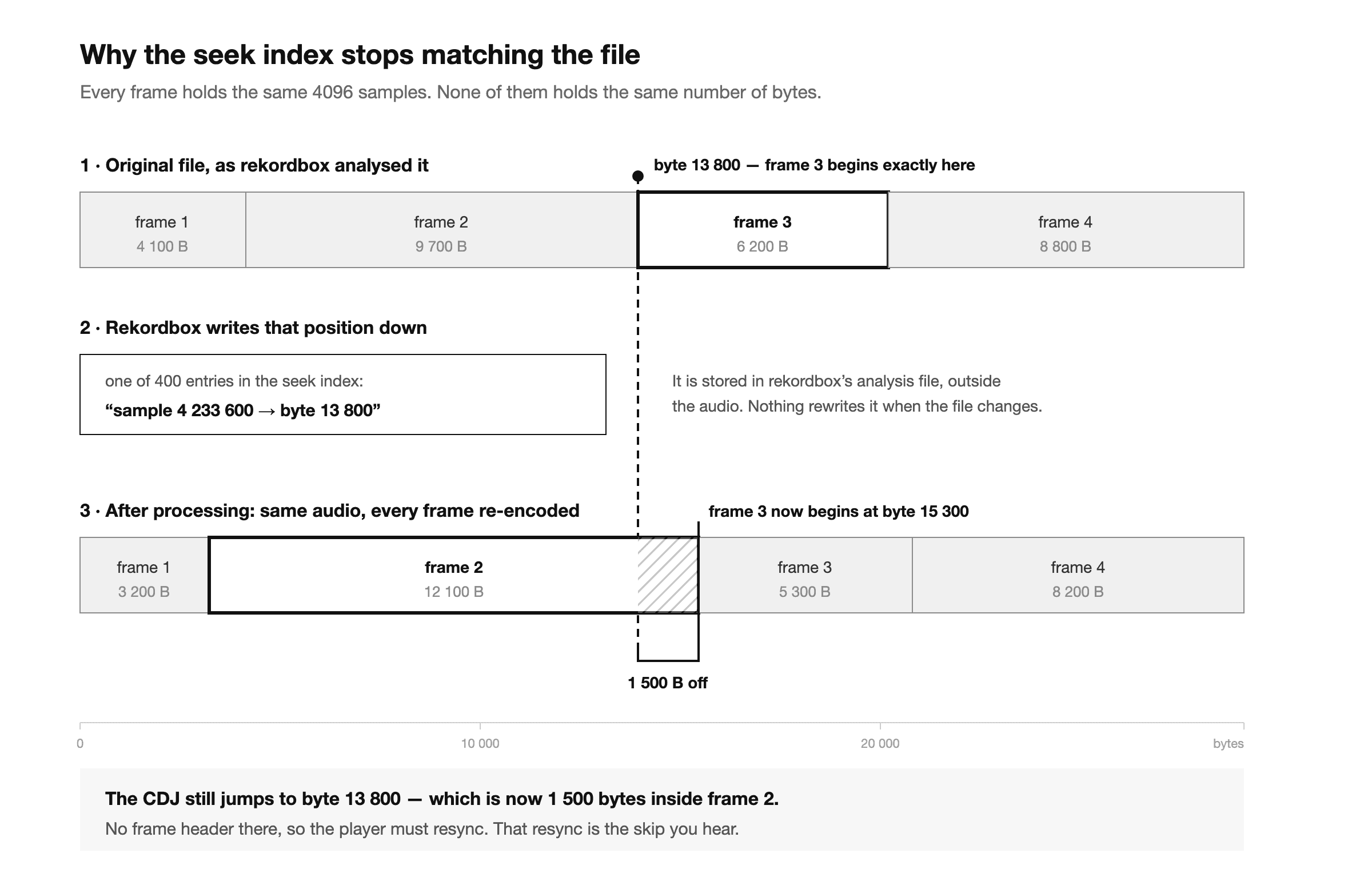
When rekordbox analyses a FLAC, it writes a seek index into that track's analysis file like ANLZ0000.EXT, in a special folder on your export drive, in a section tagged PVB2. It holds 400 entries spread across the track, and each entry is three numbers:
- a sample position,
- the byte offset of the frame containing that sample, counted from the first audio frame in the file,
- the size of that frame's sample block.
That's the entire mechanism. When you hit a hot cue, needle-drop into a breakdown, or spin through a track on the platter, the CDJ doesn't scan the file looking for the right spot. It finds the nearest entry in that table, jumps straight to that byte, and starts decoding there.
A CDJ also streams the track off the USB-stick in pieces, keeping a buffer ahead of the playhead, and it uses those same offsets to know where the next piece begins. The index isn't a convenience for scratching. So the index is also used when simply playing back the track.
It's fast, but it depends entirely on the file's frames staying exactly where they were when rekordbox looked first.
Why processing invalidates it
Any tool that changes the audio inside a FLAC has to decode the file, alter the samples, and re-encode it. There's no way around that, because the audio is compressed. Turning a track down by 3 dB means decoding it, scaling every sample, and encoding the result again.
Re-encoding produces new frames, and the new frames compress to different sizes than the old ones. Frame one might now be twelve bytes shorter. Every frame after it shifts by those twelve bytes, then the next difference stacks on top, and so on. Halfway through the track the drift is substantial.
The music is fine. The length is identical, the sample count is identical, the tags and artwork carry over. But all 400 entries in that seek index now point into the middle of frames that no longer begin there.
When a CDJ follows one of those offsets, it lands on data that isn't a frame header. It has to resync, scanning forward until it finds a real frame boundary, and that recovery is audible.
Because those offsets are used during ordinary playback and not just on cue jumps, this is what it sounds like in practice: you press play, the track runs normally, and then somewhere in the middle it stutters, jumps a fraction of a second, or drops a beat. It can happen more than once in a track, at points that have nothing to do with your cue positions. Some tracks limp through with one small glitch; others fall apart badly enough that you have to bail out of them.
Which tools trigger this
Anything that rewrites the audio. In practice that means:
- Loudness normalization and gain tools, including waveAlign, and anything else that adjusts levels destructively.
- Format conversion, including FLAC to FLAC at a different compression level, and any round trip through WAV.
- Mastering, limiting, or EQ applied to files in place.
- Sample rate or bit depth conversion.
What does not trigger it: tag editors and artwork tools that only touch metadata blocks, and rekordbox's own gain and EQ, which are applied at playback and never rewrite the file. If a tool changed only tags, the audio frames are untouched and the seek index still fits.
The reliable question to ask about any tool is simply: does it change how the track sounds when decoded? If yes, the file was re-encoded, and re-analysis is due.
The right order
- Process any FLAC-files in your rekordbox library before export, don't overwrite tracks on USB sticks.
- Select the processed tracks in rekordbox, right-click, and choose Analyze Track. Rekordbox re-reads each file and writes a fresh seek index matching the new frame layout.
- Export to your USB drive. The corrected analysis goes out with the files.
How waveAlign handles it
Because this failure is invisible until playback, waveAlign treats it as something to actively prevent. Two different messages, depending on how recoverable the situation is.
Processing FLACs in your library produces a confirmation: a reminder to re-analyse in rekordbox before exporting. Click continue and processing runs normally. waveAlign can't know whether those tracks are in your collection at all, so it flags the possibility and leaves the decision to you. The fix is fully available to you here: rekordbox can re-read the files whenever you ask it to.
Processing FLACs that live on a rekordbox export volume is refused outright, with no override. This is the case where the fix is not available: the drive is a set of copies rekordbox isn't tracking, nothing will trigger a rebuild, and the original frame layout can't be recovered afterwards. waveAlign can't rebuild the index either, because only rekordbox writes those files.
Rerouting through your library costs a minute. Not rerouting costs a track that skips on its own in front of a crowd. That's why one is a checkbox and the other is a closed door.
Frequently Asked Questions
Do I need to re-analyse a FLAC after processing it? Yes, if you play it on CDJs. Processing re-encodes the audio and moves every frame, which invalidates the seek index rekordbox built during the original analysis. Right-click the track in rekordbox, choose Analyze Track, then export.
Does this mean the FLAC file is damaged? No. The audio is intact and the file plays correctly everywhere. What's out of date is rekordbox's separate analysis of it, and re-analysing rebuilds that in seconds.
Do I need to re-analyse AIFF, WAV or MP3 files too? No. WAV seek positions are pure arithmetic and need no stored index, and MP3 seek information survives processing through its frame headers. FLAC is the only common DJ format where re-encoding invalidates stored byte offsets.
I already processed files directly on my USB. What now? Process the copies in your rekordbox library instead, re-analyse them there, and export again so the drive receives fresh analysis files. Re-analysing tracks that exist only on the USB isn't a reliable path; a clean re-export is.
Why can't the processing tool just rebuild the index itself? Those analysis files are written by rekordbox and read by Pioneer hardware using their proprietary firmware. One right-click does it correctly, which is why tools point you back to rekordbox instead.
Should I avoid FLAC for DJing then? No. FLAC is lossless, compact, and supported on newer CDJs like the NXS2 or the 3000. It just carries one ordering rule: process, re-analyse, export. Follow it and FLAC behaves like everything else in your library.
References
Like what you see? Share with a friend.
Ready for perfectly balanced audio?
Try waveAlign and experience consistent loudness across your entire library.
Buy Now